AI sprite sheet generator
AI sprite sheet generator for pixel art games
Start from one sprite, describe the motion and get every frame laid out on a sprite sheet, with frame positions and timing in a JSON file. No drawing frame by frame, no separate packing tool.
No card required. 30 free credits once you verify your email.
A real Gridize sprite sheet

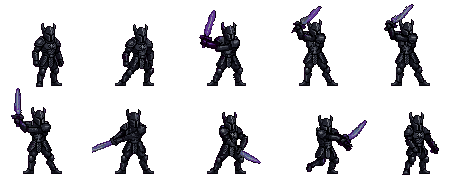
10 frames · 5 columns · 1 px spacing
animation.json (excerpt)
{
  "fps": 10,
  "playback": "loop",
  "width": 91,
  "height": 87,
  "frames": [
    { "sourceIndex": 0, "file": "frame_00.png",
      "x": 0, "y": 0, "hold": 1, "durationMs": 100 },
    { "sourceIndex": 1, "file": "frame_01.png",
      "x": 92, "y": 0, "hold": 1, "durationMs": 100 },
    …
  ],
  "sequence": [0, 1, 2, …, 9]
}
How to make a sprite sheet in 3 steps
Start from a sprite
Upload your own pixel art or character image, or generate a sprite from a prompt. It becomes the first frame of the animation.
Animate it
Describe the motion, choose 9 to 49 frames and optionally place reference images on later frames to steer the pose.
Lay out and export
Pick frames and holds, set the columns and 0 to 16 px of spacing, then download a ZIP with spritesheet.png and animation.json.
What you get in every sprite sheet
Grid-true pixels
No blurry pseudo-pixels: every frame is rebuilt on a consistent grid with a controlled palette.
Frame data included
animation.json lists each frame's position, hold and duration, plus the frame size, fps and playback order.
Your layout
Choose any column count up to the number of frames and the spacing between cells, so the sheet matches your importer.
Sheet or separate frames
Need individual files instead? Export the same selection as numbered PNG frames with the same timing JSON.
Multiple reference frames
Guide the motion with up to nine reference images placed on any frame of the clip.
Every export, every plan
Sprite sheets, PNG frames, GIF and WebP download on any plan, free included. Only generating an animation uses credits.
FAQ
Sprite sheet FAQ
A ZIP with spritesheet.png and animation.json. The JSON holds the frame width and height, fps, playback mode, each frame's x and y position, hold and duration in milliseconds, and the playback sequence.
No. Sprite sheets, PNG frames, GIF and WebP export on every plan, the free one included. Generating an animation uses credits; new accounts get free credits to start.
In Godot, use Add Frames from Sprite Sheet in the SpriteFrames editor and enter the columns, rows and separation. In Unity, set Sprite Mode to Multiple and slice by cell size with the frame size and padding. In GameMaker, use Import Strip Image with the frame count, frames per row, frame size and separation.
A packer arranges frames you already drew. Gridize creates the frames from a single sprite and then lays them out. If you already have every frame, a packer is the simpler tool.
Every frame has the same size, set by your sprite and its motion. The sheet is columns × (frame width + spacing) − spacing wide, and the exact frame size is recorded in animation.json.
The sheet holds each selected frame once. Loop or ping-pong order and per-frame holds are written to animation.json, so the sheet stays small and your engine replays the sequence.
More pixel art tools
 AI pixel art generatorDescribe a character and get game-ready pixel sprites in seconds.
 Pixel art animationTurn any sprite into idle, attack or spell animations.
 Text to pixel artFreeFree 16x16 and 32x32 sprites from a prompt, in your browser
 Image to pixel artFreeTurn any image into clean pixel art, right in your browser.
 Minecraft pixel artFreeImages to block builds with a block list and commands.
 Sprite sheet makerFreePack frames or a GIF into one sprite sheet with frame JSON.
 DesktopThe converter offline on Windows, with more settings.
Make your first animated sprite today
Sign up, verify your email and get 30 free credits to try the studio.