How do I fix AI-generated pixel art with blurry or uneven pixels?
Rebuild it on its real grid: find the intended pixel size, put a cut on every pixel edge, then give each cell one color. Sharpening or resizing won't fix it.
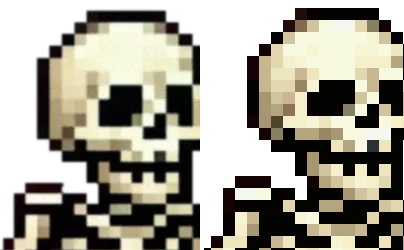
Why AI pixel art looks wrong up close
Image models such as ChatGPT, Midjourney or Stable Diffusion paint the look of pixel art at high resolution. They never draw on a grid, so the result has:
- Cells of different sizes. One "pixel" is 14 px wide, the next 17 px, so rows drift.
- Soft edges. Each edge is a few pixels of blended color instead of one hard step.
- Too many colors. Noise and gradients add hundreds of near-duplicates of each color.
- Half-transparent edges around the sprite when the background was removed.
Why resizing or sharpening doesn't fix it
Scaling down with nearest neighbour takes one sample per cell at a fixed step. When the cells are uneven, the samples drift off the cells: some land on a blurred edge, some cells are skipped and others are sampled twice. Sharpening makes the blur harder but keeps the wrong grid. The grid has to be found first.
What a real fix does
- Find the pixel size. Edges repeat at the intended pixel size, so the spacing between edges gives it, even when it is not a whole number (for example 16/3 px).
- Place a cut on every pixel edge. Each cut snaps to the strongest edge nearby, with every cell kept between 0.75× and 1.25× of the pixel size, so uneven cells are followed instead of averaged away.
- Give each cell one color. The pixels in a cell vote, with the center counting more than the blurred border. A cell that is mostly transparent becomes fully transparent; the rest become fully opaque.
- Limit the colors. Merge near-duplicates down to a set number of colors, or snap to a palette such as PICO-8 or ENDESGA 32.
Fix it in the browser for free
- Open the free image to pixel art converter and drop in the image (PNG, JPEG, WebP, GIF or BMP, up to 20 MB).
- Leave Pixel size on Auto. Set it by hand only if you know the art's pixel size.
- Set the number of Colors, or choose one of 25 presets under Palette.
- Download the PNG at its native size (one pixel per cell), plus a copy scaled up to about 1024 px for previews.
The image is processed on your device and never uploaded. AI agents can do the same through the image_to_pixel_art tool of the Gridize MCP server, free and without an account.
How well it works
On clean pixel art enlarged 3×, 5×, 6× or 8× with nearest neighbour, the converter gives back the original pixel for pixel. We also took 64×64 sprites, rendered them at 448 to 1024 px and damaged them the way AI output is damaged: cell widths varied by up to ±25%, 1 px of blur, color noise and lossy compression. The output came back at the right size in every case, with the dark outlines and transparency of the original; at most a few gray pixels near the edge of the outline differed.
When it is the wrong tool
If the image was never pixel art, such as a photo or a painting, there is no grid to recover. Converting it into new pixel art is a different job; the guide How to convert an image to pixel art covers it. If your pixel art is clean but simply scaled up, see how to scale it back down to one pixel per cell.