How do I scale upscaled pixel art back down to one pixel per cell?
Find the block size, the greatest common divisor of every same-color run, then keep one pixel per block. It is exact for art enlarged by a whole number.
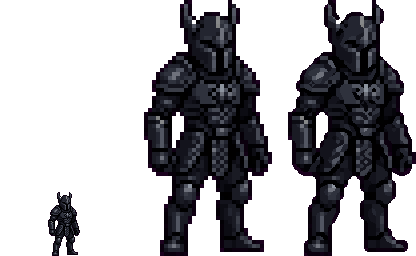
Find the block size
When pixel art is enlarged N times with nearest neighbour, every pixel becomes an N×N block. So every run of identical pixels, along any row or column, is a multiple of N, and so are the image's width and height. N is their greatest common divisor.
Example: the knight above is 128×256 px. Its runs are 4, 8, 12, 20… pixels long, all multiples of 4, and the GCD of everything is 4. The original is 128 ÷ 4 by 256 ÷ 4 = 32×64 px.
Guessing the factor from the image size alone fails often: a 256×256 image could be a 64 px sprite at 4× or a 32 px sprite at 8×.
Keep one pixel per block
Once N is known, take one pixel from each N×N block. Every pixel in a block is identical, so any one will do. Use nearest neighbour (also called point sampling) at exactly 1/N:
- Gridize pixel art resizer (free, in the browser): drop the image in. It detects the block size, shows the native size and downloads it at 1×.
- GIMP: Image → Scale Image, enter the native size, Interpolation None.
- Aseprite: Sprite → Sprite Size at 1/N, nearest neighbour.
- ImageMagick:
magick knight-4x.png -sample 25% knight.png(-samplecopies pixels,-resizewould blend them).
Don't use bilinear or bicubic scaling, and don't scale by a fraction that isn't exactly 1/N: both blend neighbouring blocks into new colors.
When the block size comes out as 1
Detection by GCD is exact, so it reports 1 when the blocks are not perfectly uniform. That happens when the image:
- was saved as JPEG or another lossy format,
- was scaled by a non-whole factor (2.8× gives blocks of 2 and 3 px),
- was blurred, smoothed or resized again by a website,
- was made by an AI model that only imitates pixel art.
Then the grid has to be estimated instead: see how to fix AI-generated pixel art with blurry or uneven pixels.
Scaling it back up for display
To enlarge the clean 1× art again, scale by a whole number only (2×, 3×, 4×…) so every pixel stays a square block. The resizer goes up to 32× and 4096 px, with nearest neighbour for hard edges or Scale2x / Scale3x when you want smoothed diagonals.